
Surfshark VPN Review 2026: Fast, Easy and Tested
In this Surfshark VPN review, I tested Surfshark on my desktop with a 1 Gbps wired connection in the Netherlands, and this review reflects what I actually found. I’ll update this review as I continue testing on mobile and other devices. Short version: Surfshark is excellent for European use and streaming, connects in seconds, and even works on US servers, just with a small difference in loading time you should know about.
Surfshark VPN Review: Quick Verdict
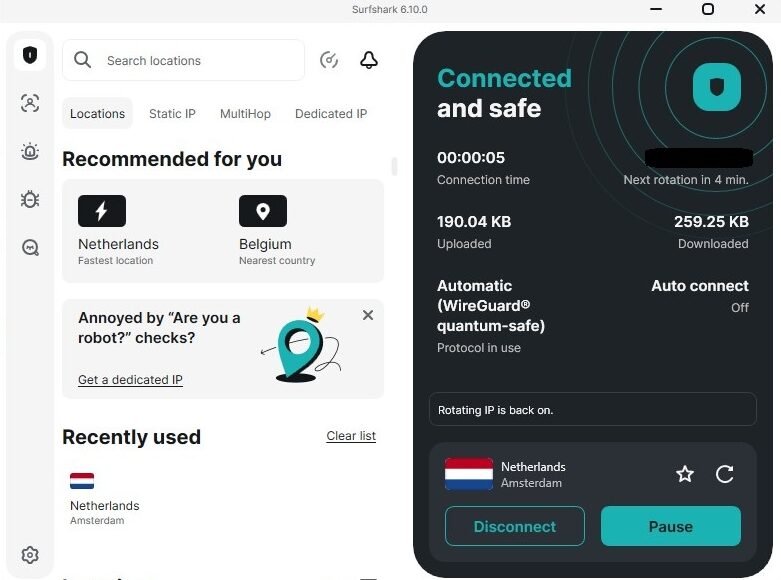
Surfshark is one of the most user friendly VPNs I’ve tested. The app is clean, connecting to any server takes under 10 seconds, and it successfully unblocked both UK and US Netflix in my tests. European server speeds are excellent. US servers from Europe load content a little slower than nearby servers, but streaming works fine once it starts.
What is Surfshark?
Surfshark is a VPN service that encrypts your internet connection and hides your real IP address. It launched in 2018 and has grown into one of the most popular VPNs on the market, largely because it offers unlimited simultaneous device connections at a competitive price. Beyond the basic VPN it now includes a built in ad blocker, antivirus, rotating IP, and even an email scam checker currently in beta.
Setting Up Surfshark VPN
Installation is straightforward. Download the app, log in, and you’re ready to connect. The interface is clean, light themed by default with an option to switch to dark mode, and well organized. The main screen shows your connection status, your current IP address, and how long you’ve been connected. Server search is fast, you just type a country or city name and results appear instantly. I had no confusion at any point during setup, which is not always the case with VPN apps.
Speed Test Results: My Real Numbers
I tested on a wired desktop connection in the Netherlands with a base speed of 1,100 Mbps download and 84 Mbps upload. Here’s what Surfshark delivered:
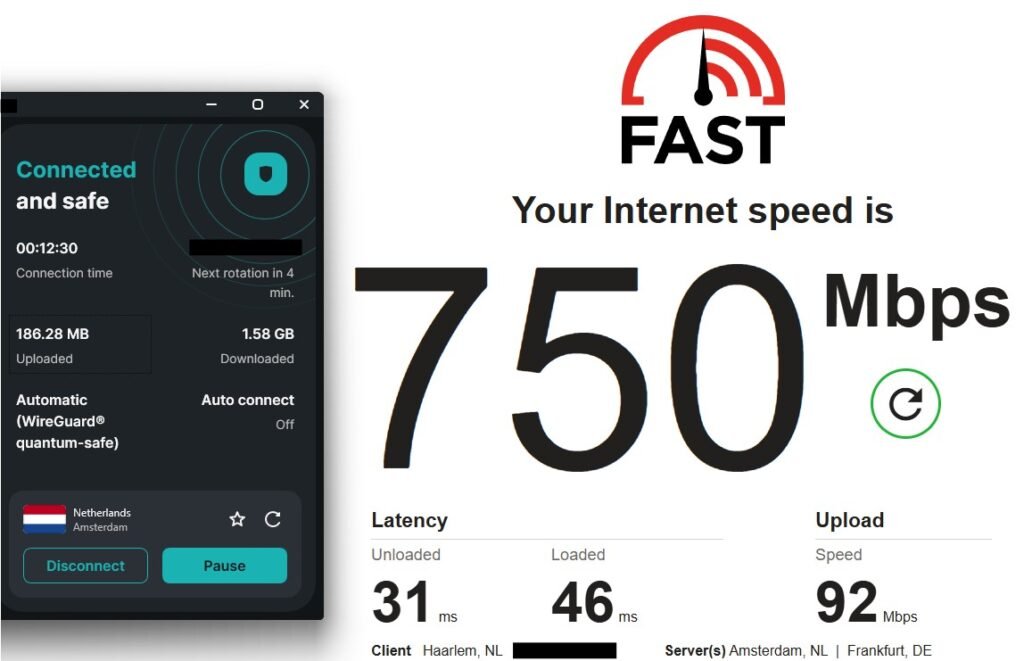
- Without VPN: 1,100 Mbps download, 84 Mbps upload, 13ms latency.
- Surfshark connected to Netherlands server: 750 Mbps download, 92 Mbps upload, 31ms latency.
- Surfshark connected to UK server: 830 Mbps download, 77 Mbps upload, 41ms latency.
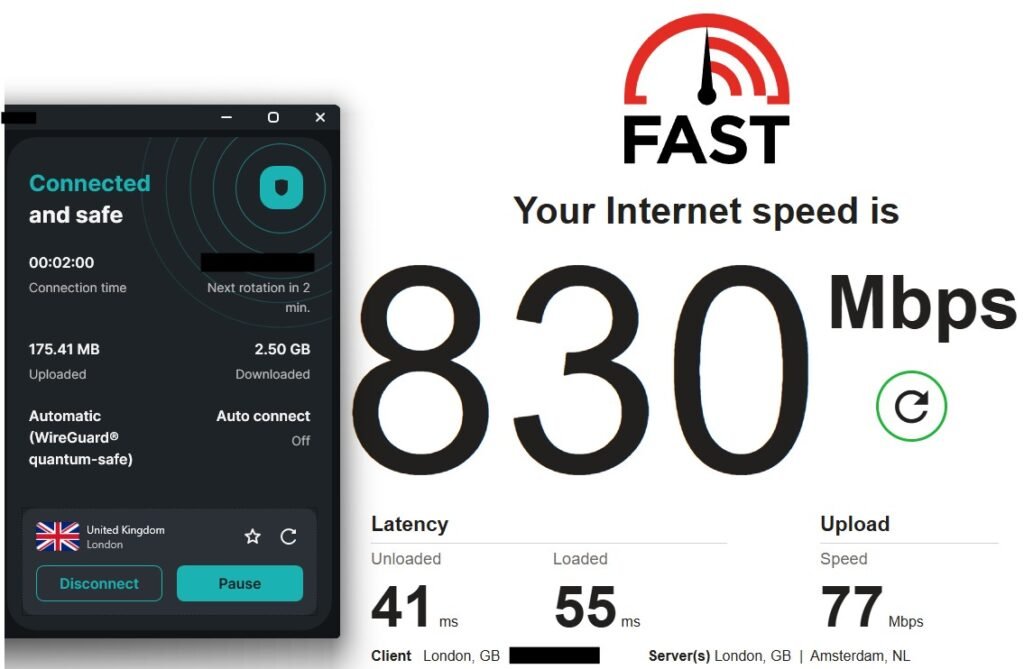
The European results are genuinely impressive. A 32% speed reduction on a nearby server is well within acceptable range and in real world use you would never notice the difference. 750 Mbps is more than enough for 4K streaming, large downloads, video calls, or anything else you throw at it.
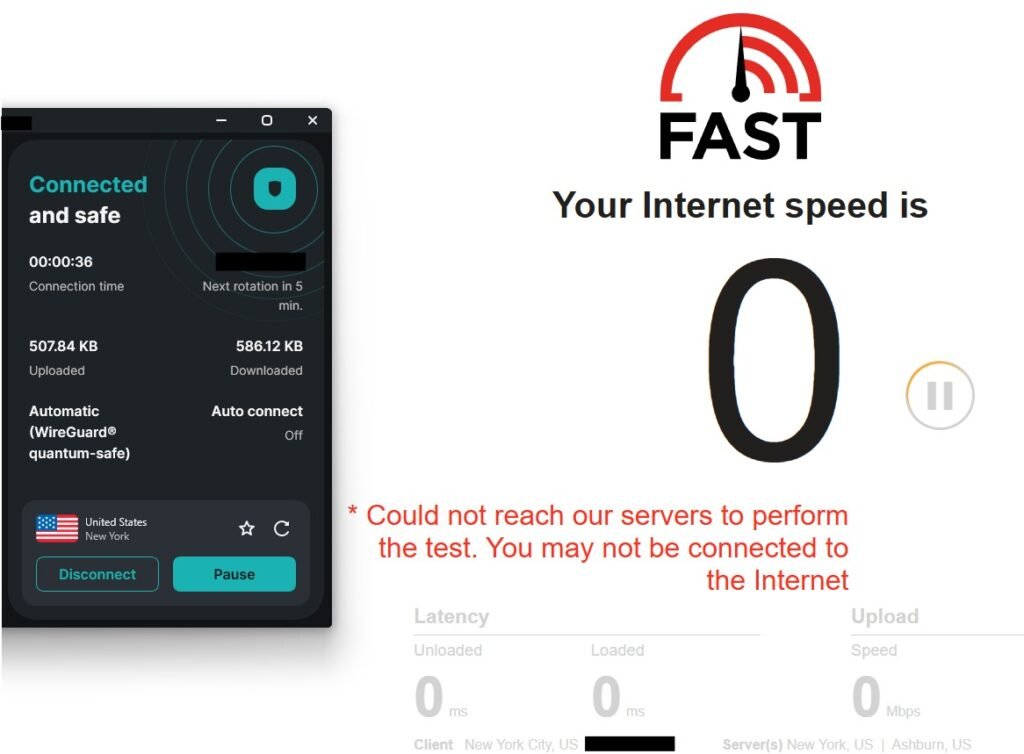
A note on US server speed tests: standard speed test tools like fast.com gave misleading results when connected to US servers from Europe, showing near zero speeds. This is because the test traffic has to travel from the Netherlands to a US server and back across the Atlantic to reach the test servers, which is not how normal browsing or streaming works. Real world performance tells a different story, which is why I tested streaming directly instead.
Surfshark VPN Streaming Test: Netflix
This is where Surfshark impressed me most. I tested Netflix on both UK and US servers from the Netherlands, and here’s what actually happened.
On the UK server, UK Netflix loaded instantly showing UK specific content and the UK top 10.

Switching to a US server, US Netflix also loaded successfully, showing the full US library including the US top 10. Dutch subtitles worked perfectly throughout.
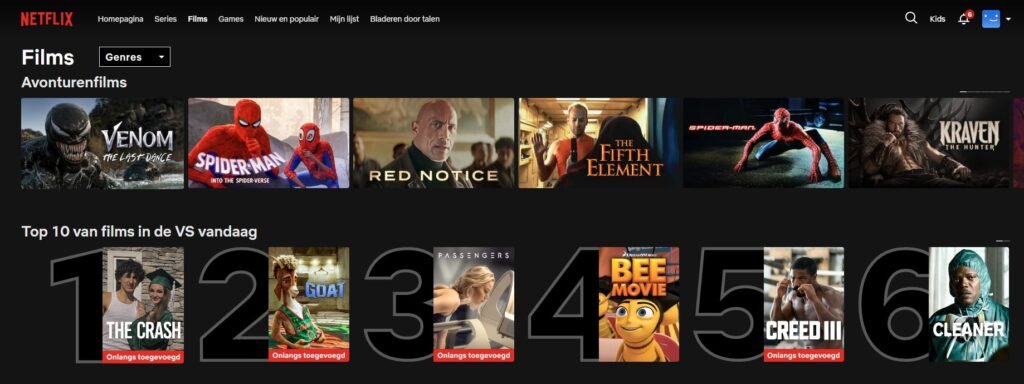
The difference in loading speed between servers is noticeable but not a dealbreaker. On the Netherlands server Netflix is instant. On the US server expect around 5 seconds of buffering before it kicks in, then it runs smoothly without interruption. For most people who just want to watch something from the US library, that wait is completely acceptable.
One thing worth knowing: during testing I occasionally hit a Netflix VPN detection error on US servers. A simple page refresh resolved it immediately and streaming continued without issues. This is a common occurrence with any VPN and not unique to Surfshark.
The App Experience
The Surfshark desktop app is one of the cleaner VPN interfaces I’ve used. Everything is where you would expect it to be. The server list is organized with a recommended section showing your fastest and nearest options, a recently used section, and tabs for Static IP, MultiHop and Dedicated IP servers. Connecting to any server happened in under 10 seconds every time I tested it.
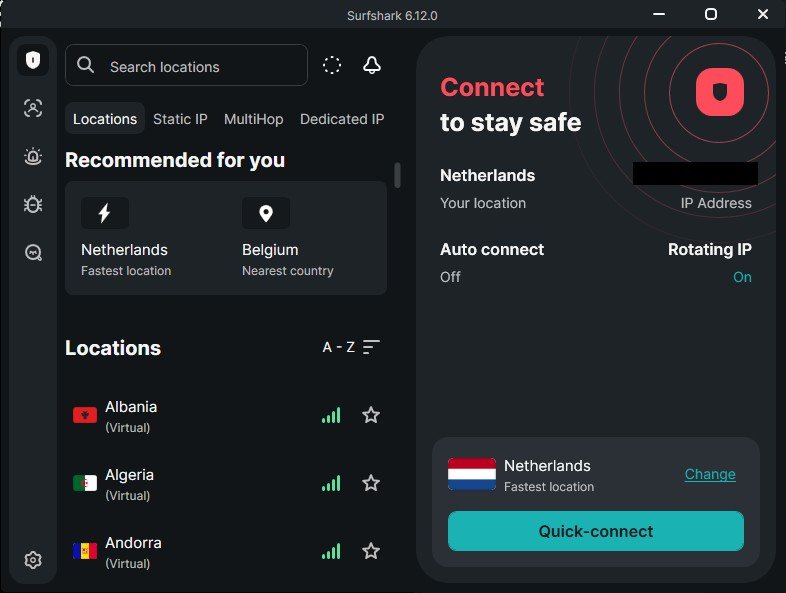
The settings screen is clearly laid out with sections for VPN settings, antivirus, web content blocker, email scam checker and app preferences. Nothing felt buried or confusing. I’d feel comfortable recommending this app to someone who has never used a VPN before.
One thing worth noting: Surfshark uses WireGuard quantum-safe protocol by default, which is their most advanced and fastest option. It also has a rotating IP feature which changes your IP address periodically for extra privacy, enabled by default.
Key Features Worth Knowing
CleanWeb:
Built in ad and tracker blocker that works at the VPN level, covering your whole connection rather than just your browser.
Kill Switch:
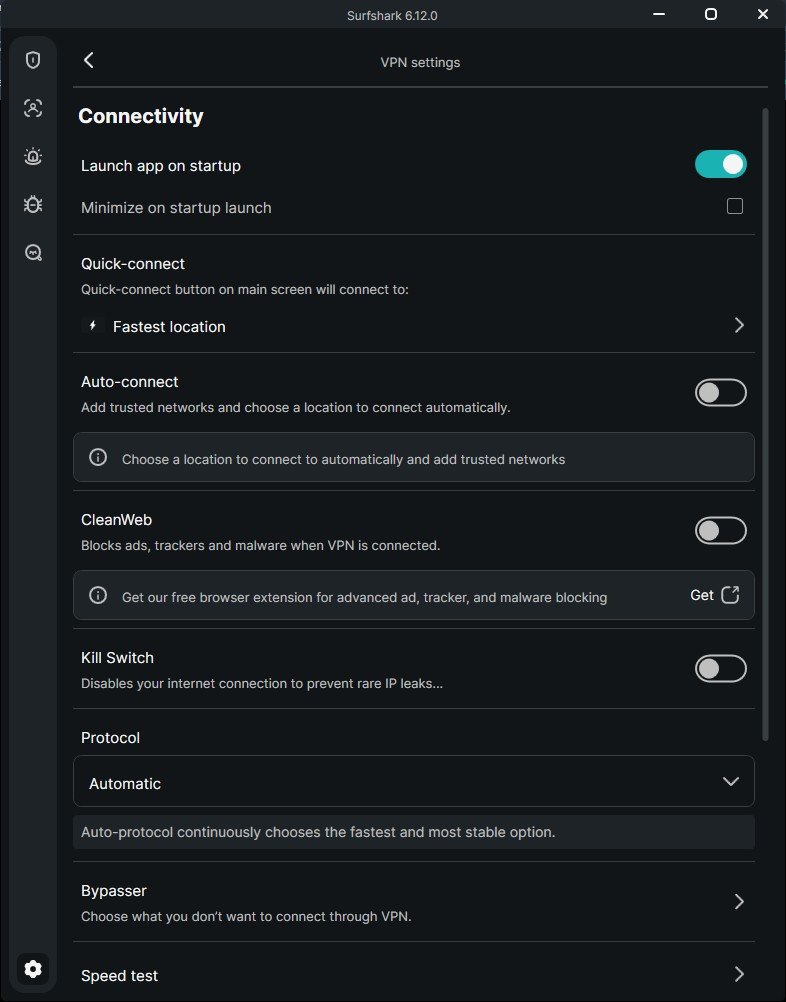
Cuts your internet if the VPN connection drops, preventing your real IP from leaking. Available in settings and worth enabling if privacy is important to you.
MultiHop:
Routes your traffic through two different countries for extra privacy. Useful if you need an additional layer of anonymity.
Rotating IP:
Changes your IP address automatically at set intervals without disconnecting you, making it harder to track your activity.
Antivirus:
Built in device protection included in higher tier plans, no separate app needed.
Email Scam Checker:
Currently in beta, scans your Gmail inbox for scam attempts. A unique feature I haven’t seen in other VPNs.
Unlimited Devices:
One subscription covers every device you own with no limit. A genuine advantage over competitors that cap you at five or six devices.
Pricing
Surfshark offers three plans to suit different needs, all including a 30 day money back guarantee. The 24 month plan gives the best value and includes 3 extra months free.
Surfshark Starter: the core VPN with CleanWeb ad blocker and Alternative ID. From €2.49/month on the 24 month plan (€67.23 total), €3.39/month on 12 months, or €16.45/month on a rolling monthly basis.
Surfshark One: everything in Starter plus antivirus, Alert and Search. From €2.79/month on the 24 month plan (€75.33 total), €3.59/month on 12 months, or €18.95/month monthly. This is the most popular plan and the one I’d recommend for most people.
Surfshark One+: everything in One plus data removal via Incogni and identity theft coverage. From €4.49/month on the 24 month plan (€121.23 total), €7.49/month on 12 months, or €21.85/month monthly.
For most people the Surfshark One plan on 24 months hits the best balance of price and features. The antivirus alone makes it worth the small step up from Starter.
Pricing varies by region and changes with promotions. Visit Surfshark’s pricing page for current deals as they regularly offer significant discounts on longer plans.
Who is Surfshark Best For?
Based on this Surfshark VPN Review, Surfshark is a great choice if you want a fast, easy VPN for streaming, privacy and everyday browsing. The app is beginner friendly without feeling too simple, and the feature set is genuinely competitive at the price point.
For families or people with multiple devices, the unlimited simultaneous connections is a real advantage. One subscription covers your desktop, laptop, phone, tablet and smart TV without any extra cost.
If you specifically need instant loading US content from Europe, nearby European servers will always be faster. But if a few seconds of initial buffering is acceptable, US streaming works fine.
If privacy is your main priority rather than speed, our Proton VPN review is worth reading. For a feature packed alternative with a large server network, check our NordVPN review.
Pros
- Excellent European server speeds with minimal performance drop on nearby servers.
- Clean, intuitive app that anyone can use without a learning curve.
- Connects to any server in under 10 seconds.
- Successfully unblocks both UK and US Netflix.
- US streaming works from Europe with a small initial buffer, then runs smoothly.
- Generous feature set including antivirus, ad blocker and rotating IP.
- Unlimited simultaneous device connections.
- 30 day money back guarantee.
Cons
- US servers from Europe have a noticeable initial loading delay of around 5 seconds before streaming settles.
- Kill switch is off by default, you need to enable it manually.
- Some features like email scam checker are still in beta.
- Standard speed test tools give misleading results on long distance servers, which can cause unnecessary concern.
Surfshark VPN Review Final Verdict
Surfshark is genuinely one of the easier VPNs to recommend for everyday use. It is fast on European servers, the app is clean and intuitive, and it does what most people actually need a VPN for, including unblocking streaming content from the UK and US. The initial loading delay on US servers is worth knowing about but it did not stop Netflix from streaming perfectly once it got going.
If you want a reliable, feature rich VPN that just works without a complicated setup, Surfshark is worth trying. The 30 day money back guarantee gives you enough time to test it properly on your own connection and see if it fits the way you use the internet.
Testing continues on mobile and additional devices. This Surfshark VPN Review will be updated with new results.