

Proton VPN Review 2026: Speed & Streaming Tested
Proton VPN comes from Proton AG, the Swiss company behind Proton Mail and Proton Drive. That background shapes almost everything about the product: strong privacy defaults, servers built for security over raw speed, and an app that leans into transparency rather than flashy features. We ran Proton VPN through a full round of testing from a wired connection in the Netherlands, covering speed, server load, and Netflix access in three regions, to see how it actually performs rather than what the marketing promises. This Proton VPN review is based entirely on that hands-on testing, not on manufacturer claims.
QUICK VERDICT
Proton VPN holds up well on both privacy and real-world performance. It’s a strong pick if:
✅ You want maximum privacy: Swiss jurisdiction, audited no-logs policy
✅ The free plan matters to you, it’s one of the few genuinely usable free VPN tiers
✅ You want Secure Core routing for an extra layer of protection
✅ You need reliable speeds for streaming, tested and confirmed above
Skip it if you need the absolute lowest price or servers in very obscure locations, other providers price more aggressively on short plans.
Why Proton VPN Stands Out
- Swiss Privacy: Based in Switzerland with strong privacy laws and no surveillance alliances.
- True Privacy Focus: Strict no-logs policy, independently audited.
- Secure Core Network: Routes traffic through hardened servers in privacy-friendly locations for extra protection against advanced tracking.
- Strong Security Features: WireGuard and OpenVPN protocols, kill switch, DNS leak protection, split tunneling, plus NetShield ad and tracker blocking.
- Open Source Apps: Code is publicly available and independently reviewed.
Proton VPN Review Methodology: How We Tested
Testing was done on a desktop PC over a wired 1 Gbps connection in Den Haag, with a Proton Unlimited account. We measured a no-VPN baseline first, then connected to servers in the Netherlands, the United Kingdom, and the United States, running a speed test and a Netflix library check on each. Server load, protocol, and connection time were noted directly from the app for every test.
Speed Test Results
| Server | Download | Upload | Latency | Server Load |
| No VPN (baseline) | 1,100 Mbps | 84 Mbps | 13 ms | —– |
| Netherlands (NL#503) | 850 Mbps | 98 Mbps | 47 ms | 35% |
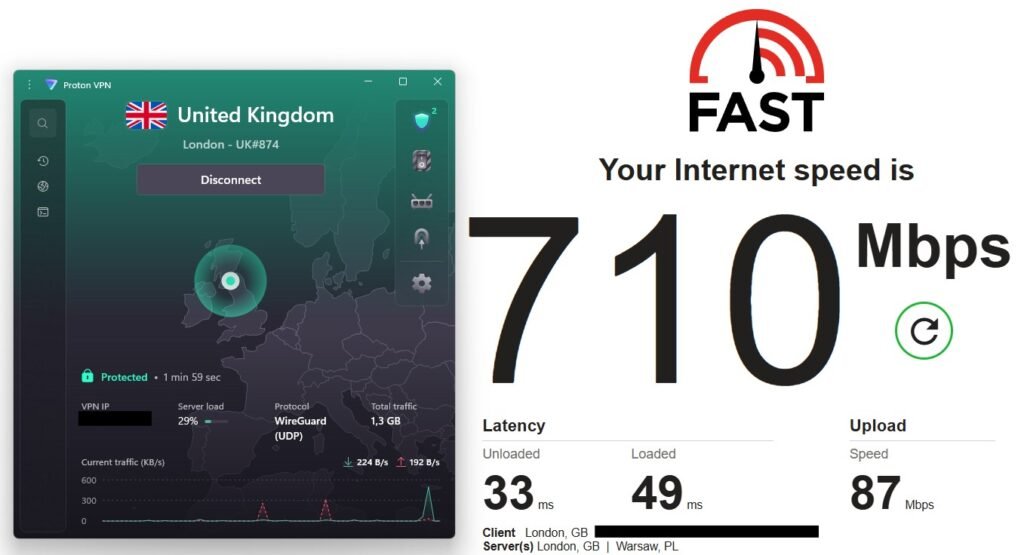
| United Kingdom (UK#874) | 710 Mbps | 87 Mbps | 49 ms | 29% |
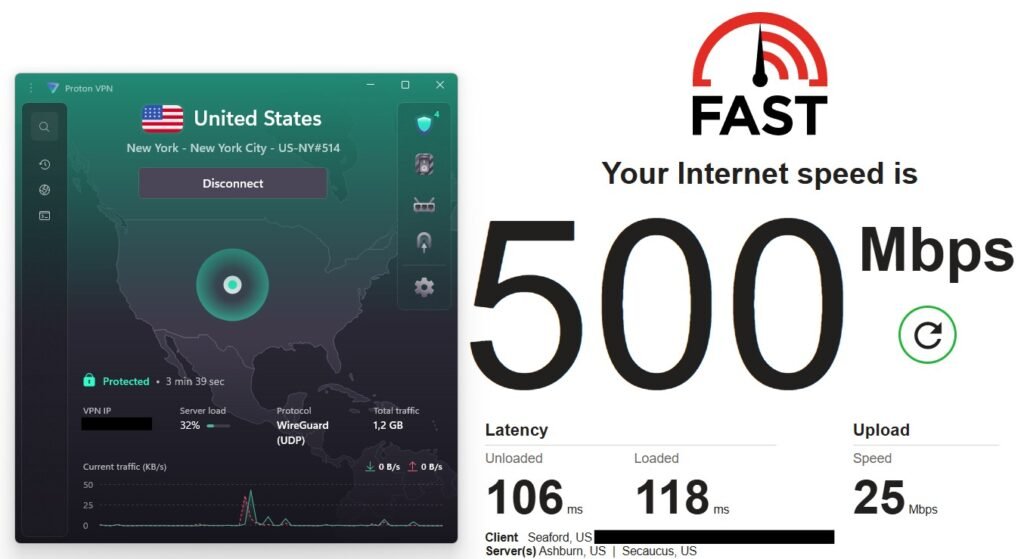
| United States (US-NY#514) | 500 Mbps | 25 Mbps | 118 ms | 32% |
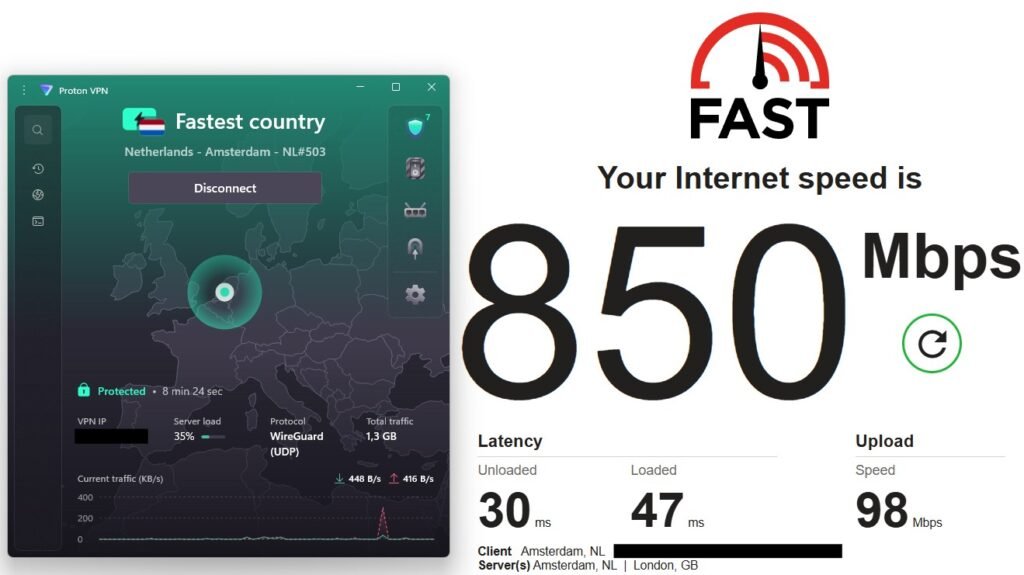
The Netherlands server held up best against the baseline, keeping the vast majority of the raw connection speed while actually improving upload throughput, likely down to routing rather than anything Proton is doing specifically. However, the UK server dropped download speed by roughly a third but stayed comfortably fast enough for 4K streaming or large downloads. The US server showed the expected transatlantic hit: latency more than tripled and download speed roughly halved, which is normal for VPN traffic crossing an ocean, but still fast enough for smooth streaming and everyday browsing.
All three servers connected on WireGuard UDP by default, which is the fastest protocol Proton offers and explains why speeds held up as well as they did even on the long-distance US route.
Netflix and Streaming
Streaming is where a lot of VPNs quietly fail, so we tested both UK and US Netflix libraries directly rather than taking Proton’s word for it.
- Netflix UK: Unlocked, with the UK Top 10 list loading correctly.
- Netflix US: Unlocked, with the US Top 10 list loading correctly, and Dutch subtitle options were available on US content.
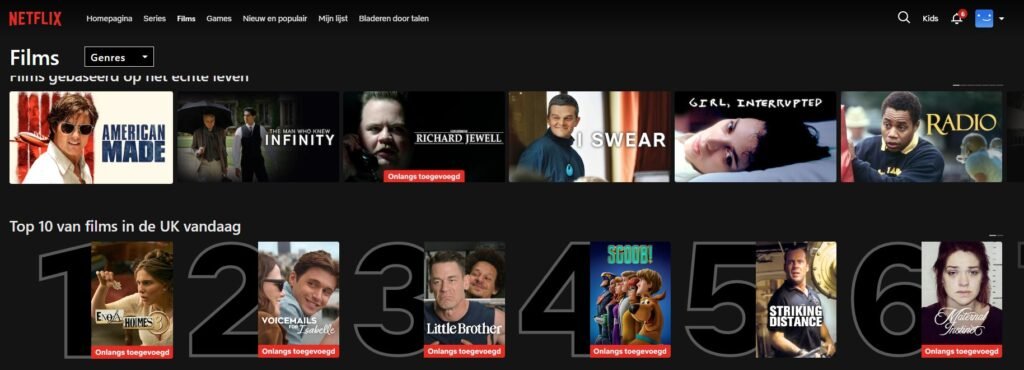
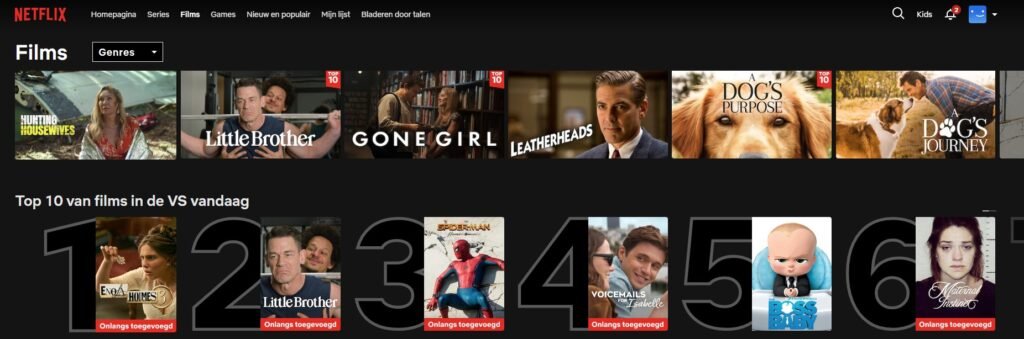
Both regions worked without needing to switch servers or clear cache, which isn’t a given with every VPN on the market. Streaming performance can vary on Secure Core servers due to the extra routing hop, so for streaming specifically, a standard server is the better choice.
The App: What It Looks Like Day to Day
Proton VPN’s app uses a dark theme built around a world map, showing your connection visually rather than just as a list. It’s a small touch, but it makes the app feel more like a security tool and less like a generic utility.
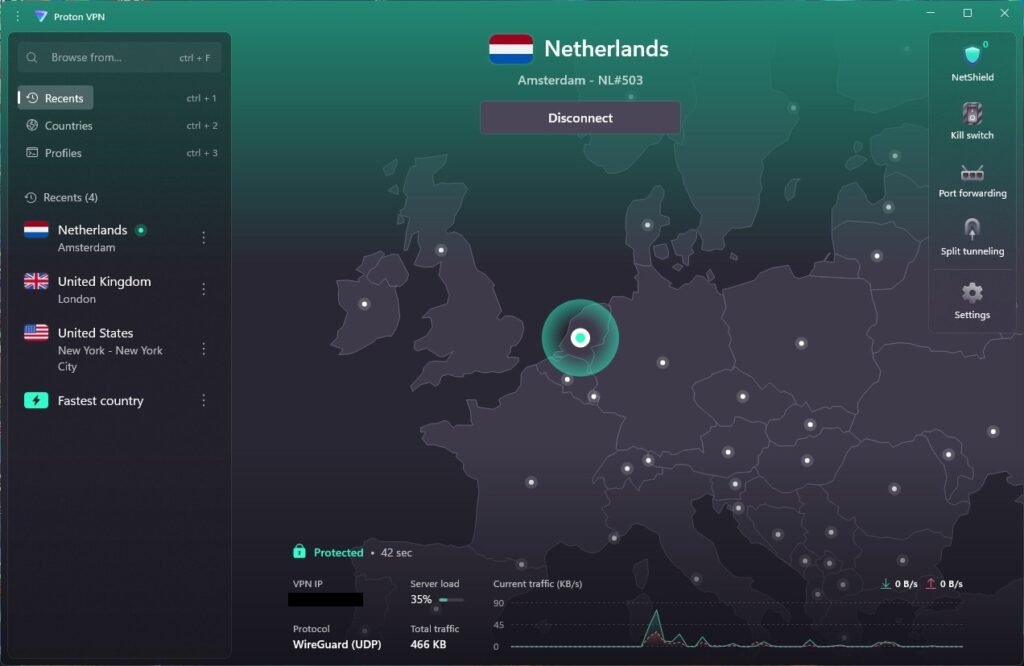
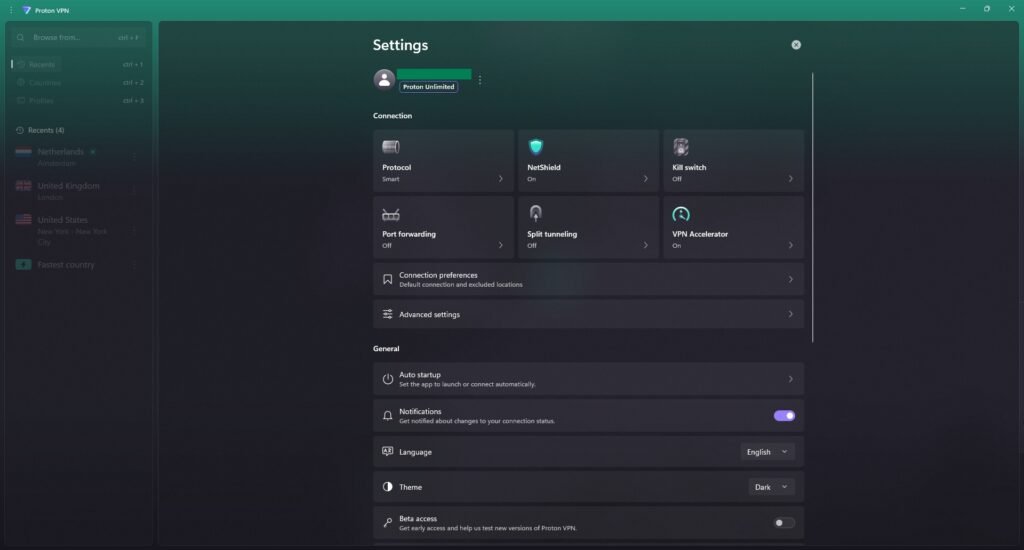
Default settings on a fresh install:
- Protocol: WireGuard UDP
- NetShield (ad and malware blocker): On
- Kill Switch: Off
- VPN Accelerator: On
- Port forwarding: Off
- Split tunneling: Off
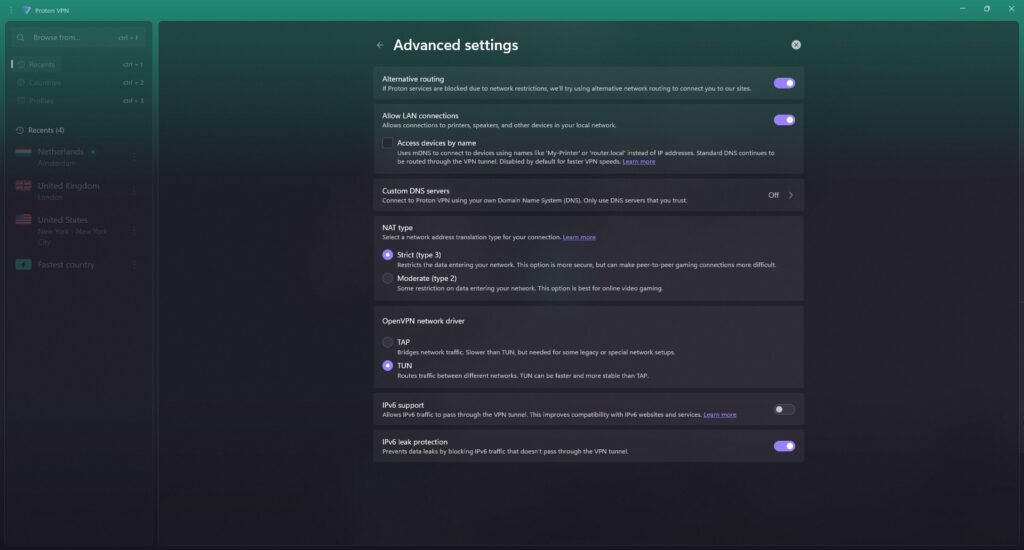
The Kill Switch being off by default is worth flagging, and turning it on isn’t the whole story either. Proton offers two kill switch modes: Standard and Advanced. We tested both by forcing a disconnect and an app crash. Standard mode did not block traffic in either case, by design, it’s built to reconnect quietly rather than hard-block, not a flaw, just a different philosophy. Advanced mode did block reliably in both tests. If kill switch protection is something you’re actually counting on, not just a checkbox, switch to Advanced mode specifically, Standard alone won’t give you that.
Proton VPN Pricing & Plans
This Proton VPN review wouldn’t be complete without a clear look at what it actually costs. Proton VPN keeps things simple with a clear free tier plus paid options that scale with your needs. For most users, the Plus plan offers the best balance between price and features.
Free Plan
- Unlimited data, genuinely rare for a free VPN
- Access to servers in a handful of countries, automatically assigned
- Medium speeds, suitable for light browsing and basic privacy
- No ads, no data selling.
VPN Plus (Recommended)
- $9.99/month monthly, drops to $3.99/month on a 1‑year plan.
- Access to 17000+ servers in 125+ countries.
- All core privacy features: Secure streaming, Secure Core, NetShield Ad-blocker, and 10 simultaneous devices.
Proton Unlimited
- Priced $12.99/month and drops to $9.99/month on a 1 year plan.
- Unlocks full functionality for Proton VPN with Proton Mail, Proton Drive, and other Proton services.
- Best if you already use or want encrypted email and cloud storage alongside your VPN.
All paid plans come with a 30‑day money‑back guarantee, so you can test Proton VPN risk‑free. If you’re mainly after privacy and a solid free option, the free plan is a great starting point; if you want full features and better speeds, the Plus plan is the best value.
Who Should Use Proton VPN?
- Privacy-conscious users who want a Swiss-based, audited no-logs VPN
- People who want a genuinely usable free plan without data caps or constant upsells
- Users who value Secure Core, open-source apps, and strong security features
- Anyone already using Proton Mail or Proton Drive who wants a single privacy ecosystem
- Users who prioritize privacy over absolute lowest price
If you need the cheapest possible paid plan or servers in very obscure locations, other options may suit you better.
Alternatives
NordVPN offers a larger server network and is consistently rated among the fastest VPNs available, a strong choice for speed-focused users.
Surfshark stands out for unlimited simultaneous devices at a very competitive price, ideal for households or users with many devices.
Proton VPN’s unique advantage over all three is its Swiss jurisdiction, open-source apps, and verified privacy credentials. If privacy is your primary concern, Proton leads the pack.
Pros and Cons
Pros:
- Strong, consistent speeds even on the transatlantic US route
- Both UK and US Netflix libraries unlocked without extra steps
- Built by a company with a long, verifiable privacy track record
- Genuinely useful free tier if someone just wants to try the app first
- 30-day money-back guarantee on every paid plan
Cons:
- Kill Switch is off by default, and Standard mode won’t actually block traffic on disconnect, Advanced mode is needed for real protection
- Monthly pricing is high compared to competitors; the value only shows up on longer plans
- No dedicated static IP option for anyone needing one for work access
Final Verdict
This Proton VPN review confirms the privacy reputation is backed by real performance too. Speeds stayed strong on nearby servers, the US connection held up better than most transatlantic routes, and both Netflix regions unlocked cleanly on the first try. The app is refined and the map interface makes it easy to see exactly what’s connected. The main adjustment for new users is remembering to switch the Kill Switch on manually, and to specifically choose Advanced mode, since Standard mode won’t block traffic on disconnect the way most people expect a kill switch to.
For anyone who already values Proton’s approach to privacy, or wants a VPN from a company with skin in the security game beyond just the VPN product, this is a strong pick, especially on the 1-year plan where the price becomes genuinely competitive.